
LegendPeeps
Home Apps Productivity Quick Cursor: One-Hand Aid
Quick Cursor: One-Hand Aid

Quick Cursor: One-Hand Aid

4.42
|
V3.0.1
|
1M+
Quick Cursor: One-Hand Aid screenshot Quick Cursor: One-Hand Aid screenshot Quick Cursor: One-Hand Aid screenshot Quick Cursor: One-Hand Aid screenshot Quick Cursor: One-Hand Aid screenshot Quick Cursor: One-Hand Aid screenshot Quick Cursor: One-Hand Aid screenshot Quick Cursor: One-Hand Aid screenshot

App Information

Category Productivity
Developer Sergiu Șandor
Version 3.0.1
Content Rating Everyone
Price Free
Min Android 7.0
Updated Jul 9, 2026

Description

Quick Cursor is an accessibility tool for people who need help operating their smartphone with one hand. It is built for users with motor impairments, limb differences, hand tremors, or limited hand mobility.

Who is this app for?
Modern smartphones are large and usually require two hands or significant reach. Quick Cursor is made for people who face challenges using their device, including:
○ People with motor impairments (partial paralysis, post-stroke recovery, spinal cord injuries)
○ People with hand tremors (Parkinson's disease, essential tremor, multiple sclerosis)
○ People with chronic hand conditions (arthritis, RSI, carpal tunnel)
○ People with temporary impairments (broken arm, post-surgery, hand in a cast)
○ Anyone who can only use their device comfortably with a single hand

How it helps
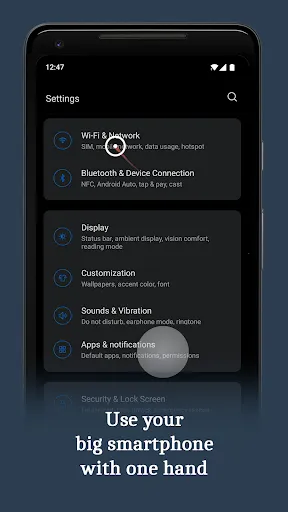
Quick Cursor adds a virtual cursor controlled by the thumb in the bottom half of the screen. Users can reach the entire screen without stretching, shifting grip, or risking dropping the device. Touches, swipes and gestures can be performed precisely from one comfortable position.

Easy to use
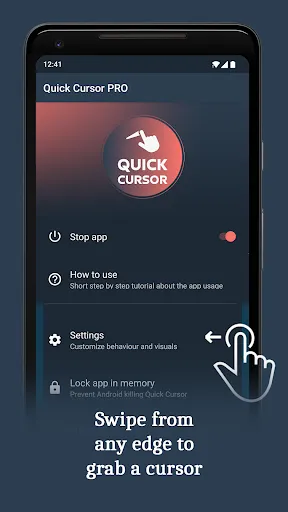
1. Swipe from the left or right edge in the bottom half of the screen to grab a cursor.
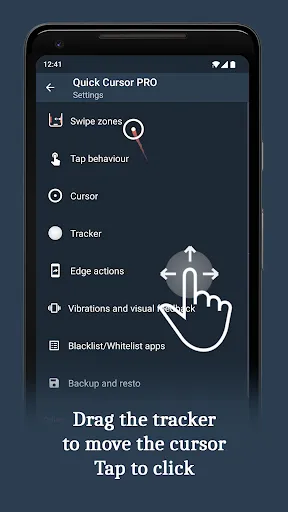
2. Reach the top half of the screen by moving the tracker with your thumb.
3. Tap the tracker to click at the cursor position. The tracker disappears after a short inactivity period.

The app is free and without ads!

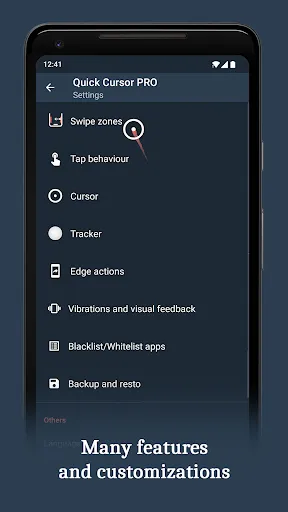
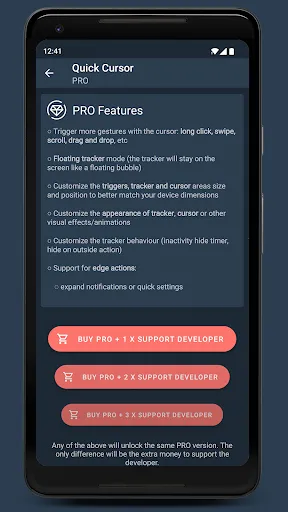
The PRO version unlocks additional accessibility features for users with more complex needs:
○ Trigger actions - perform shortcuts directly from the screen edge, reducing hard-to-perform gestures
○ Tracker actions - a quick action menu for users with limited finger dexterity
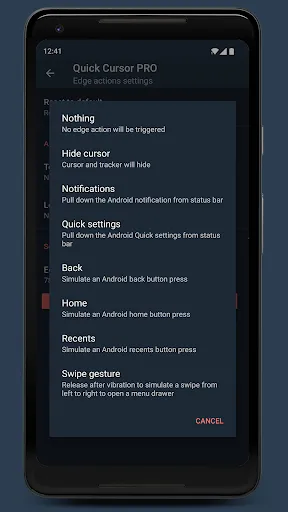
○ Edge actions - trigger actions from the screen edges, replacing difficult system gestures
○ Floating tracker mode - the tracker stays on screen like a floating bubble for constant access
○ Customize trigger, tracker and cursor visuals and sizes for low vision or motor preferences
○ Customize tracker behaviour (inactivity hide timer, hide on outside action)
○ Unlock the full set of assistive actions:
- expand notifications or quick settings without reaching the top of the screen
- simulate home, back or recents button presses
- screenshot, flashlight, lock screen, copy, cut, paste, split screen, open app drawer
- launch apps or app shortcuts; media shortcuts: play, pause, next, previous
- change brightness, volume, auto rotate and more
- simulate complex gestures (swipes, pinches, long taps, drag-and-drop)
○ Customize vibrations and visual feedback
○ Backup and restore all accessibility settings
● Support the developer of this free, ad-free accessibility tool

Privacy
The app does not collect or store any data from your smartphone.
The app does not use any internet connection - no data is sent over the network.

Accessibility service
Quick Cursor requires you to enable its accessibility service before use. This is required because the app's core assistive function - simulating a touch at the cursor position on your behalf, so users with limited reach can operate the whole screen one-handed - can only be done through the Android Accessibility API.

The service needs these capabilities:
○ View and control screen - to draw the assistive cursor over other apps and define the trigger zones
○ View and perform actions - to perform the touch on your behalf at the cursor position (the core assistive function)
○ Observe your actions - for the "temporarily disable" feature, which pauses Quick Cursor when you switch apps

These capabilities are used solely for the assistive cursor and related accessibility features.

Feedback
Many users with disabilities have shared how Quick Cursor helped them use their phones independently again. Your feedback is welcome:
Telegram: https://t.me/quickcursor
Reddit: https://reddit.com/r/quickcursor/
Email: [email protected]

Downloads

V3.0.1

Size: 5.65 MB

Updated: 2026-07-09

User Reviews

4.42
3K+ Reviews
5
78%
4
8%
3
3%
2
0%
1
11%
ElnurAze
Jul 8, 2026

Amazing app , thanks 🔥🔥🔥

Setét Kevin
Jul 7, 2026

it dissapears

radtech
Jul 7, 2026

didn't work right out of the gate. said to email developer. sorry, not going to bother if it can't work properly from the start. pixel 6

Deodita Campilan
Jul 7, 2026

its good!

Lawrence O'kneeyee “Professor” Oladiran
Jul 6, 2026

Beautiful ! Fluid ! Effortless !

Windel Ollete
Jul 3, 2026

this app is so cool I love it

Gerardo Battista
Jun 29, 2026

A really good app; it certainly hasn't disappointed me based on what I've tried so far. So, I ended up purchasing the additional features. I definitely recommend it.🔥🫪🗿

Germán Camilo Martínez Villate
Jun 26, 2026

The app is great, but I'm on a pixel and was unable to fix the Android 15 bug, it worked for a some minutes then noting. I'll wait for A16... Hopefully it'll work then.

Yaw D.
Jun 24, 2026

Changed the way I use my phone. I dislike how large phones have gotten but this makes them a lot easier to deal with.

Zahra Farhan
Jun 20, 2026

good love it