LegendPeeps
Home Apps Tools BlazeClean
BlazeClean

BlazeClean

4.46
|
VV1.0.2
|
1M+
BlazeClean screenshot BlazeClean screenshot BlazeClean screenshot BlazeClean screenshot BlazeClean screenshot

App Information

Category Tools
Developer Alsaeed
Version V1.0.2
Content Rating Everyone
Price Free
Min Android 7.0
Updated Jul 7, 2026

Description

BlazeClean is a lightweight storage management tool designed to assist Android users in organizing their device files and managing installed applications. By scanning for unnecessary data and providing a clear overview of storage usage, BlazeClean helps users maintain a tidy file environment.

Core Functionality

• Junk File Cleaner

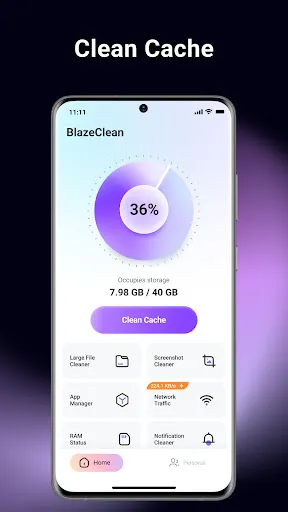
BlazeClean scans your device to identify temporary files, app cache, AD junk, and residual files left behind by uninstalled applications. Users can review these files and remove them to reclaim storage space.

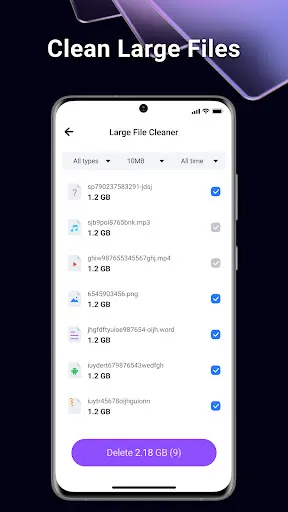
• Large File Management

The application analyzes internal storage to locate large files (such as videos, audio, and documents) that occupy significant space. It categorizes these files by size and type, allowing users to easily browse and decide which files to delete to free up space.

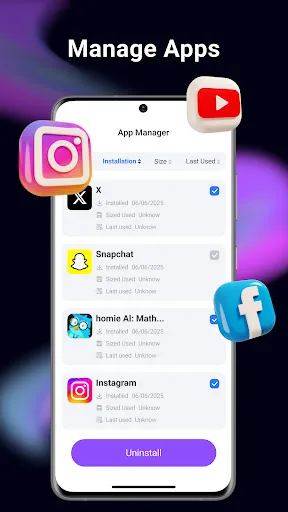
• Application Manager

View a comprehensive list of installed applications along with the storage space they consume. The App Manager tool facilitates the identification of infrequently used apps and supports quick uninstallation to release storage.

Technical Features

• Safe Cleaning: The scanning algorithm is designed to distinguish between temporary junk and vital user data to prevent accidental deletion of important files.

• User-Controlled: All deletion actions require user confirmation. The app does not automatically delete files without permission.

Privacy and Security

BlazeClean is committed to user privacy and strictly follows Google Play's developer policies:

• Local Processing: All file scanning and cleaning operations are performed locally on your Android device.

• No Data Uploads: We do not upload your personal files, photos, or documents to external servers.

Permission Usage: The app requests storage permissions solely for the purpose of identifying and removing junk files.

How to Use

1.Launch BlazeClean and grant the necessary storage access permissions.

2.Select "Clean Cache" to scan for cache and residual files.

3.Use "Large Files" to review big media files stored on your device.

4.Use "App Manager" to uninstall unwanted applications.

Confirm any deletion tasks to free up space.

Note: This app is a file management utility. It focuses on cleaning storage and does not claim to alter hardware performance parameters or modify system settings.

Downloads

VV1.0.2

Size: 24.34 MB

Updated: 2026-07-07

User Reviews

4.46
6K+ Reviews
5
77%
4
11%
3
3%
2
2%
1
8%
Happy Mkhatshwa
Jul 8, 2026

excellent

David
Jul 7, 2026

awesome app 👌 it does its job

Kristie Macleod
Jul 7, 2026

constant popups of cleaning every few seconds, another app that won't allow use of any other function but the app. had to uninstall to use my device without constant interference by app

Tijani Raji
Jul 7, 2026

very good app and excellent 👌

Wynand JvR
Jul 7, 2026

Brilliant and effective App...I enjoyed so much.....

Flordeliza Pajarito-kruszewski
Jul 7, 2026

fast,progressive, and efficient

Somabhai Patel
Jul 6, 2026

delate advertise

Aliga Anthony
Jul 6, 2026

interesting

Roseline Omoko
Jul 6, 2026

thank you

Charles Grasso
Jul 5, 2026

so far-so good