

| Category | Tools |
| Developer | Apple |
| Version | 4.0.3 |
| Content Rating | Everyone |
| Price | Free |
| Min Android | 6.0 |
| Updated | May 19, 2025 |
doesn't work over the Wi-Fi or the cord. just ends up lagging out
I'm HATE iOS
great customer service
very good app
only moved some texts? randomly selected who to include
worst ever. i simply want to tranfer whatsapp data which is move from android to ios ok, very troublesome though. next step apple id login followed by 2FA, i realize that my number with esim in iphone cannot receive the code...can never pass through .... multiple trials u always hit issue here or there. complete ly waste of time
1 STAR! Move to ios i thought is easy but it took me 3 hours to set my new 11th gen with Android when I realised the ratings people had the same problems no code nothing, it was confusing with me and I didn't know what to do now I had to do another option, sadly apple didn't fix this error I saw people say in the 2021 and 2022 it used to work I saw but now how can it not work please hear me out New apple players u have to do something else move to ios is hard Apple hear me out please fix this!!!
iPhone gives a code and says to type it in the move to ios app on the driod phone. I have looked everywhere and there is no such place to put a code. I shouldn't have to fight tooth and nail to accomplish what should be a simple task.
👍
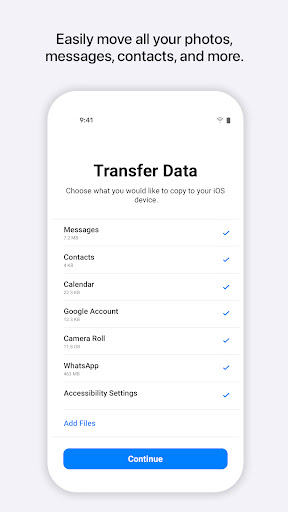
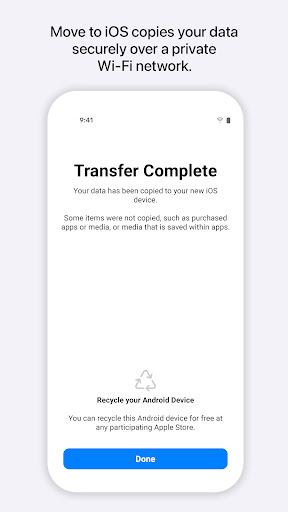
It's very efficient in moving everything. There are a few downfalls to be aware of though: 1) Your phone needs to be above 45%, or else it will stop the download 2) Does not keep CONTENTS of your apps (i.e. the notes from Notes App and Password manager must be retyped into Apple device)

Junk Eraser - Storage Manager

XTranslate - Photo, Voice, PDF
Lite PDF: PDF Viewer

TickTock-TikTok Live Wallpaper

AT&T ActiveArmor®

ZArchiver

Screen Mirroring - TV Miracast

Phone Cleaner - Virus Scan

Tidy Cleaner - Quick Clean

Calculator Launcher