
LegendPeeps
Home Apps Tools JLab
JLab

JLab

4.14
|
V1.9.9.0
|
1M+
JLab screenshot JLab screenshot JLab screenshot JLab screenshot JLab screenshot JLab screenshot JLab screenshot JLab screenshot

App Information

Category Tools
Developer JLab Audio
Version 1.9.9.0
Content Rating Everyone
Price Free
Min Android 7.0
Updated Mar 4, 2026

Description

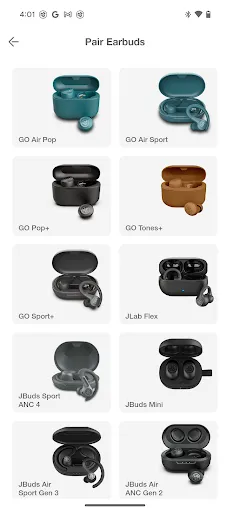
Compatible Models:
GO Pop+
GO Sport+
JBuds Air Pro
JBuds Air Pro ANC
JBuds Air ANC (Gen 2)
JBuds ANC 3
JBuds Air Sport (Gen 3)
JBuds Mini
Work Buds
Epic Air ANC (Gen 2)
Epic Air Sport (Gen 2)
Epic Lab Edition
GO Work (Gen 2)
JBuds Lux ANC
JBuds Sport ANC 4
Rewind 2
Flex
Studio+
Studio Pro+
Epic Work ANC
JBuds Open Sport
GO Pop ANC
Epic Sport ANC 3
Epic Open Sport
GO Pods ANC
JBuds Pods ANC
GO Lux ANC
Epic Lux Lab Edition
Studio 2

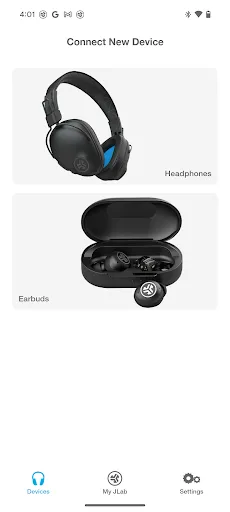
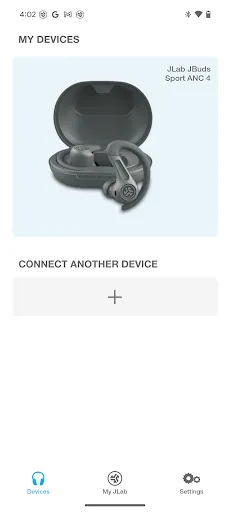
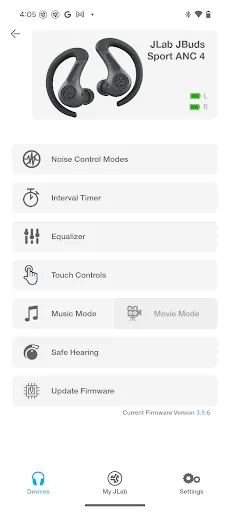
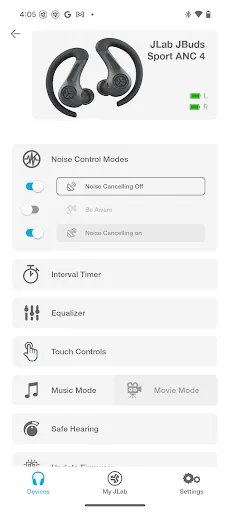
The new and improved JLab app offers complete customization for all JLab App compatible models. Adjust Noise Control settings, Be Aware, touch controls, safe listening levels, and sound to your personal preference – or use the presets for JLab Signature, Balanced, or Bass Boost. Plus, get software updates for your product right when they’re available.
 
 
Active Noise Cancellation Control
With the new JLab App, you'll be able to increase the active noise canceling from off all the way to max ANC, (on your ANC compatible earbuds) while in the earbuds themselves you can only select on or off.
 
 
Be Aware Audio
Bring the outside in. Use the JLab App to increase or decrease the amount of outside noise you let in by adjusting your Be Aware settings. (For Be Aware Compatible earbuds only)
 
 
EQ Customization
Fine tune your sound by adjusting the equalizer settings. JLab products come set with three default settings - called Custom EQ3 Sound, which features JLab Signature, Balanced and Bass Boost and a 4th option 'Custom'. Use the JLab App to test and set your own equalizer settings by adjusting Bass (200, 280, 400 Hz levels), Mid-Range (550, 770, 1000, 2000 Hz levels) and Treble (4000, 8000, 16000 Hz levels).
 
 
Custom Controls
JLab products come with controls in each earbud that control anything from volume, track changes, play/pause and more. If you'd like to switch the settings, you can customize your controls further via the app.

 
Safe Hearing
All future JLab models will now support Safe Hearing. Switch between the default output, 95 dB, or 85 dB for a safe listening experience.

Downloads

V1.9.9.0

Size: 59.26 MB

Updated: 2026-03-04

User Reviews

4.14
4K+ Reviews
5
66%
4
10%
3
8%
2
2%
1
14%
Luther Shessia
Jul 5, 2026

awesome app lots of good 5hings from controlling the lights from brightness speed fluctuation preset EQ 10 band custom equalizer and free witch is the best

Loretta Cable
Jul 5, 2026

Just purchased my JLab GoPOP+ earbuds, still customizing. But so far, I like them.

Cedrick Ivan Rotiquio
Jul 5, 2026

Need to improve the EQ custom because the frequency don't match to the actual frequency so it's confusing to use and the volume level is lower than the other EQ. I'm using JLAB J1 OPEN PODS.

Gordon Chalmers
Jul 3, 2026

great

Caelin Bruce
Jul 3, 2026

Touch sensors on headphones/earbuds are counter-intuitive to the point of hostility. Literally NOBODY wants this, you lose all credibility when you claim this is a requested feature. Headphones dont even fit in the charging case, battery fried after 91 days. Boycott is growing against every company that uses touch sensors for headphones, and the monopolized markets selling nothing else. Shouldnt need a broken app to disable a feature that shouldnt exist anywhere but hell. Use mechanical buttons!

Robert Creamer
Jun 30, 2026

excellent clear sound

Victoria “ru.V. ru.” Bean
Jun 30, 2026

Just started using the app. It couldn't function on my old phone but on my new one yes. It was also easy for me to set it up! 👍🏾😉😃

Wil Steele
Jun 28, 2026

nice controls and features for such a cheaply priced device!

Spiders
Jun 27, 2026

Im rating this so low due to a very annoying feature of the app, im not sure if this is maybe a glitch, but every time I use my headphones my app setting reset. I typically have all touch controls turned off, and it will randomly turn everything back to default settings, so often times I will set off touch controls not knowing they are even on.

Somnath Mane
Jun 27, 2026

all time best 🫶