

LegendPeeps
Home Apps Personalization City On Fire Home App
City On Fire Home App

City On Fire Home App

4.16
|
V1.4
|
1M+
City On Fire Home App screenshot City On Fire Home App screenshot City On Fire Home App screenshot City On Fire Home App screenshot City On Fire Home App screenshot

App Information

Category Personalization
Developer Hadiz Studio
Version 1.4
Content Rating Everyone
Price Free
Min Android 8.0
Updated Dec 17, 2025

Description

Welcome to City On Fire Home App!

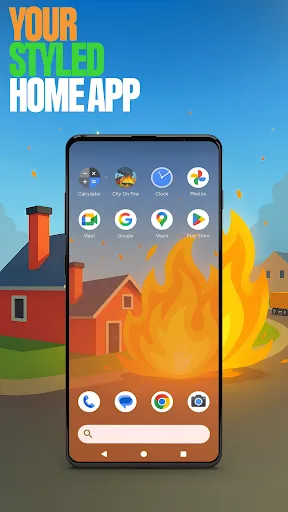
Create a home screen that truly reflects your style. This launcher lets you fully customize your layout, organize apps into folders, and choose your own color scheme. With its clean design and fresh feel, it brings a new level of personalization and to your everyday experience.

You can pick this app as the default choice via the “Default home app” setting to use this as your day-to-day launcher. You can switch back to your previous launcher anytime you choose.

⚡ Ignite the City On Fire Game! ⚡
Step into the flames as you blaze through the city! In City On Fire, you play as a living flame whose goal is to set the world alight! every spark spreads chaos and power. Burn buildings, earn rewards, and grow your fire to unstoppable strength as you climb through explosive levels. It’s fiery, fast-paced, and thrilling - perfect for quick bursts of pure destruction fun.

Open via the game icon on your home screen.

🌙 City On Fire Home App Features: 🌙

The features listed below are available via your home screen. Long-press an empty area on your home screen to open the pop-up menu.

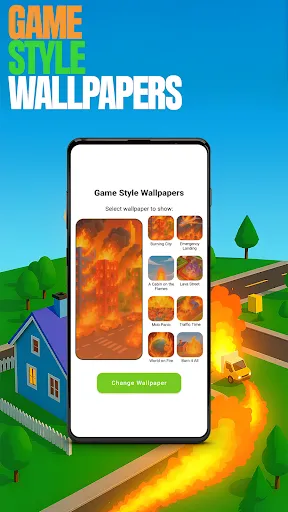
✅ Game Style Wallpapers – Add unique wallpapers inspired by the City On Fire game.
Long-press on home screen → click "Game Style Wallpapers".

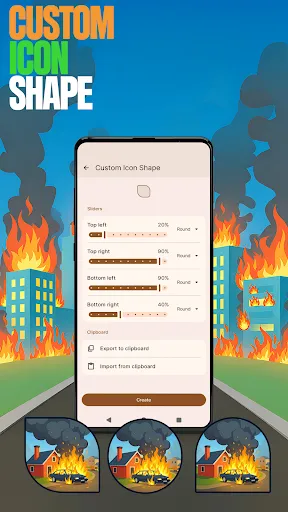
✅ Custom Icon Shape – Personalize your device with fun icon shapes and custom icon looks.
Long-press on home screen → click "Custom Icon Shape".

✅ Custom Gestures – Swipe or tap to quickly open an app, settings or app drawer.
Long-press on home screen → click "Home settings" → Gestures.

✅ Hide Apps – Keep your private apps invisible while staying fully in control.
Long-press on home screen → click "Home settings" → "App drawer" → "Hidden apps".

✅ Accent Color – Customize your home app colors. Use presets or create your own device style.
Long-press on home screen → click "Home settings" → General → "Accent color".

Note: When using this home app, your home screen’s layout may be changed. You can customize the layout as you wish. Your previous home’s layout is not affected once you switch back.

User Reviews

4.16
8K+ Reviews
5
74%
4
5%
3
2%
2
2%
1
17%
Melissa Celedonio
Jul 9, 2026

pure adds this game ihate this game

Anton Magdy
Jul 9, 2026

very much advertising app, also it's hard to remove after installation, it's spam app making the phone to light up when you don't using it to open adds without any action from you .. DON'T DOWNLOAD

colin m
Jul 7, 2026

This app is a virus, Not sure why google play hasn't Delete it off their store,

Nicholas M Jarrell
Jul 3, 2026

ruined my settings on the phone

Aaron Reeves
Jul 3, 2026

virus. Adds home screen to make adware.

Ava Midget
Jul 3, 2026

it was bad It was fun for a few minutes than it was boring and it was a virus DO NOT DOWNLOAD ITS A VIRUS IT WILL CHANGE YOUR HOME SCREEN AND YOUR APPS

Étienne Parent
Jul 3, 2026

Quick warning dont install this app it changes your entire home screen user interface

Brayden Fox
Jul 3, 2026

messes up my phone do not download

Yahir Pineda
Jul 1, 2026

i want my home screen back to the way it was

Harshit Ahuja
Jun 30, 2026

It told me to changed my home screen and it rearranged my apps, which was very frustrating, while I was using it, and I had to spend time restoring my device to the way it was before.